


D&R AIRCAST 7.40 – 라디오 자동 송출 소프트웨어
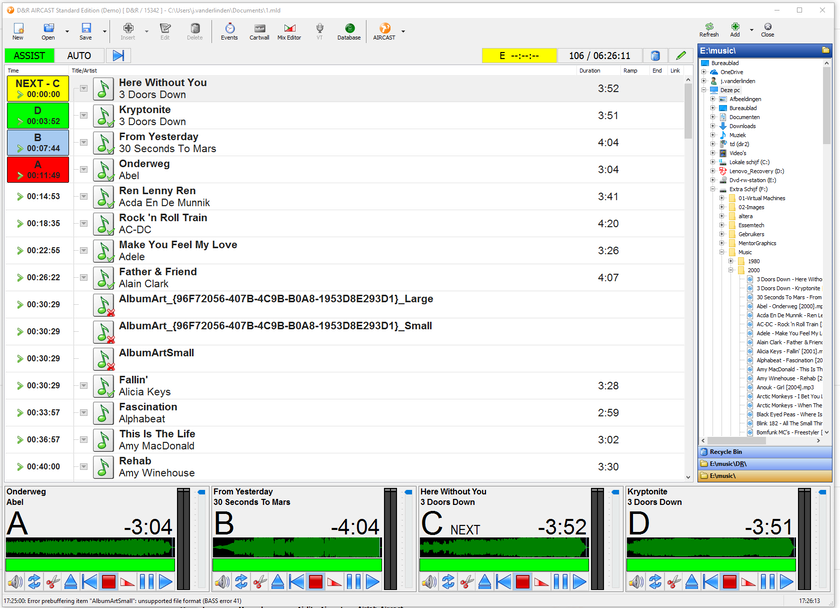
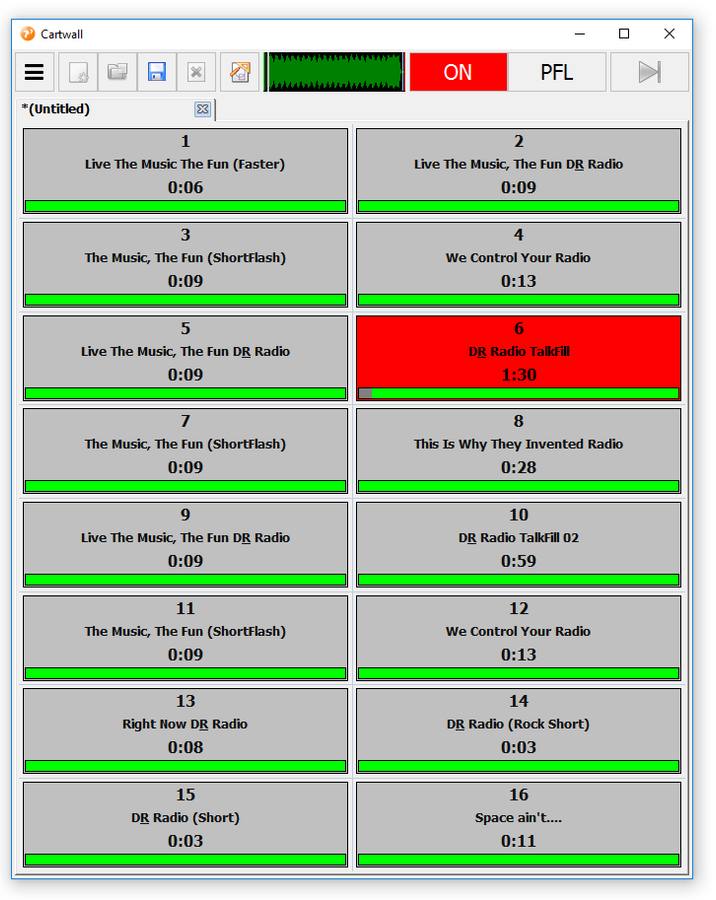
Aircast 7.40은 소규모·중형 라디오 방송국을 위한 자동 송출과 Live Assist 소프트웨어입니다. 플레이리스트, Cartwall, Cue·Mix 편집, Voice Tracking과 파일 로그를 제공하며 일반 PC와 다양한 사운드카드에서 운용할 수 있습니다.
주요 특징
- 자동 송출과 Live Assist 운용
- Playlist·Cartwall·Cue Editor·Mix Editor
- Voice Tracking과 Mixdown
- 오디오 데이터베이스와 음악 스케줄링
- 원격 제어·이벤트·파일 로그 지원
추천 활용
- FM·인터넷 라디오 자동 송출
- 무인·야간 방송
- 방송 편성 및 음원 라이브러리 관리
제품 정보
| 브랜드 | D&R Broadcast |
| 모델 | AIRCAST 7.40 |
| 제품 유형 | 소프트웨어 |
| 상담 | 설치 환경과 구성에 따라 별도 견적 |
세부 사양
Aircast is designed to seamlessly integrate into any standard PC environment running Microsoft Windows. Compatible with a range of Windows operating systems, including XP, Vista, 7, 8, 10, and Windows Server (2008 or above), Aircast ensures broad accessibility and usability. System requirements: Aircast operates on both 32-bit and 64-bit Windows platforms, offering flexibility and compatibility. On Windows server, installation of the desktop experience feature is required to access the necessary codecs for MP3 playback. However, Windows Desktop OS already includes these codecs through Windows Media Player. Aircast imposes minimal performance demands on your PC, making efficient use of system resources. On a current i5 CPU, Aircast typically consumes only 2-3% CPU (excluding encoders and sound processing) and less than 50 MB RAM. The base setup requires just about 30 MB of disk space (excluding database and caches), ensuring efficient resource utilization. Audio hardware compatibility: With extensive support for various audio APIs (DirectSound, WASAPI, ASIO), Aircast is compatible with virtually any Windows-compatible soundcard. While most setups require no additional configuration, some advanced settings may need adjustment in Aircast's audio configuration or driver settings for optimal performance. Aircast's versatility extends to fully automated encoder-only instances, where no audio hardware is required. This enables direct streaming to Shoutcast/Icecast servers, making it suitable for datacenter servers. While virtual machines can be utilized, physical hardware is preferred for optimal performance. However, virtual machines will function adequately if the Windows real-time clock is properly configured. For seamless integration and optimal performance, we recommend testing compatibility between Aircast and your existing audio hardware using our demo version.
Webstation 12 Control switches + encoder ON (USB channels only) CUE (USB channels only) Faderstart (USB channels only) Airlite MK2 16 Control switches ON CUE Faderstart Source select ON-AIR 1/2 CUE reset Airence 24 Control switches + encoder ON (USB channels only) CUE (USB channels only) Faderstart (USB channels only) Airlab-DT Faderstarts 24 Control switches + encoder (If Control module is present) AXUM | AXITE Faderstarts 24 Control Switches + encoder (If Control module is present)







상품평
아직 상품평이 없습니다.